Wasting Class Time on Manual Roll Calls? Riotouch VisionRoll AI Face Attendance Simplifies School Teaching
Are you still taking attendance verbally or using paper sign-in sheets in class? Traditional attendance checking eats up valuable teaching time. After class, teachers also have to calculate attendance rates and sort student records manually, which creates extra heavy workloads.
To solve common pain points in education scenarios, Riotouch independently developed VisionRoll, an AI face recognition attendance tool. It is perfectly compatible with all Riotouch 4K interactive flat panels. Powered by smooth touch screen interaction and advanced AI facial recognition technology, it delivers an all-in-one classroom attendance solution.
VisionRoll integrates on-site camera attendance, photo upload via mobile QR code, manual attendance status editing, automatic data calculation and report export. It is specially designed for small and medium-sized classes. The system identifies three attendance statuses: PRESENT, LATE and LEAVE. It instantly calculates the number of present students, absentees and overall attendance rate without any manual math work, allowing teachers to focus more on teaching.
1. System Operation Requirements
Riotouch VisionRoll has low compatibility thresholds. It only requires the interactive panel to run Android 13 or above. All new-generation Riotouch education interactive displays support smooth installation and stable operation of this software.
2. 3-Step Device Binding & Configuration (For Administrators)
Before using Riotouch VisionRoll, administrators need to complete three layers of binding and authorization on the DMS backend: device, school and class. This ensures cloud synchronization of attendance data, normal access to camera and storage permissions, and permanent storage of all attendance records for later review.
2.1 Bind Device to OEM Account
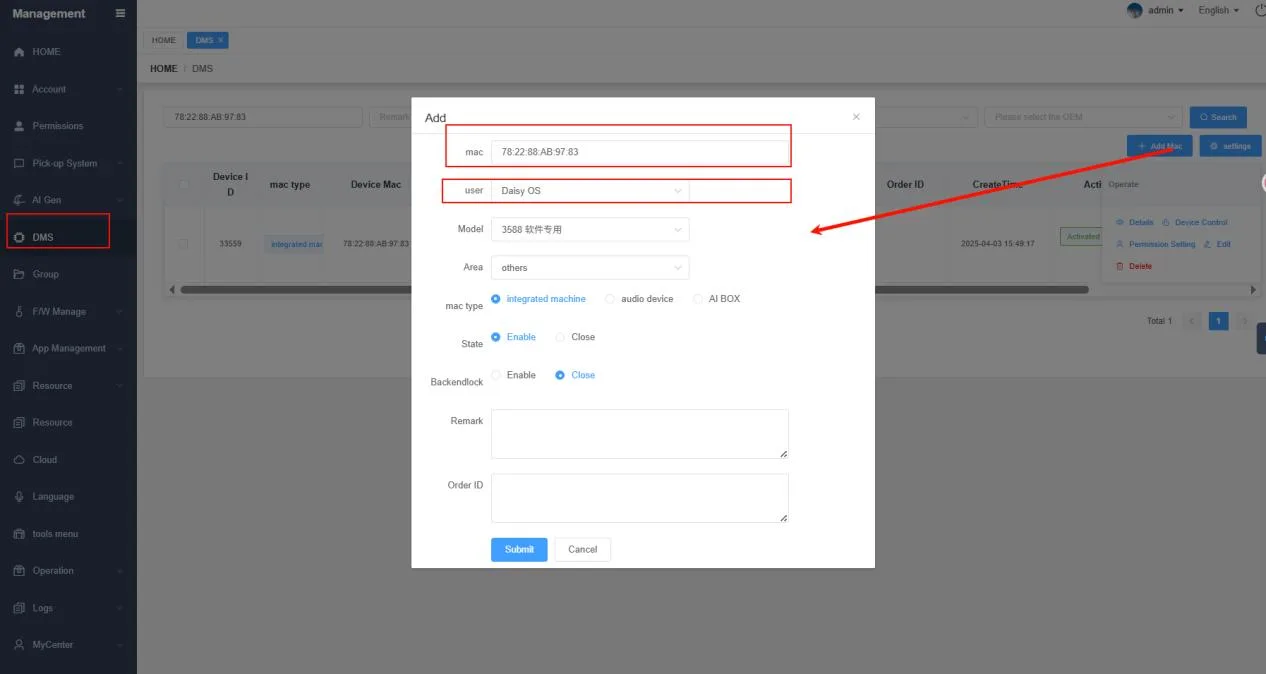
Super administrators log into the DMS backend, navigate to the DMS module, fill in hardware information including device MAC address and OS version, then finish binding the device to the OEM account to activate basic access to VisionRoll.
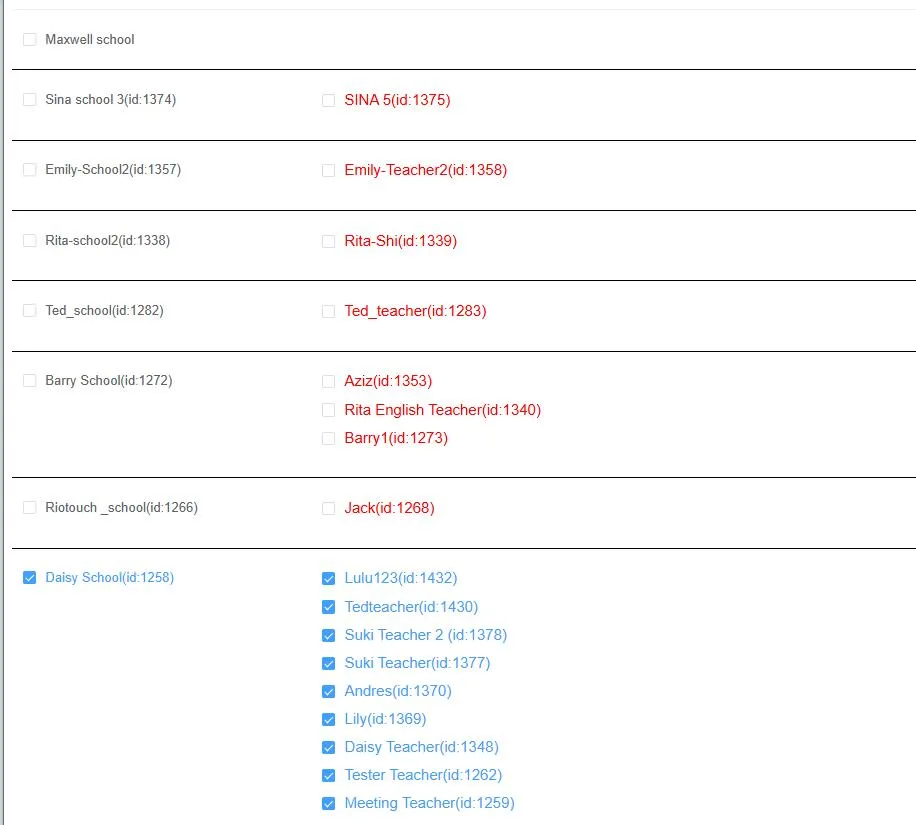
2.2 Authorize Device to Corresponding Schools & Teachers
Select the target device in the DMS device list and click the Authorize button. Tick matched schools and teacher accounts to distribute permissions. Only authorized accounts can log into Riotouch panels and access full attendance functions.
2.3 Bind Device to Specific Classes
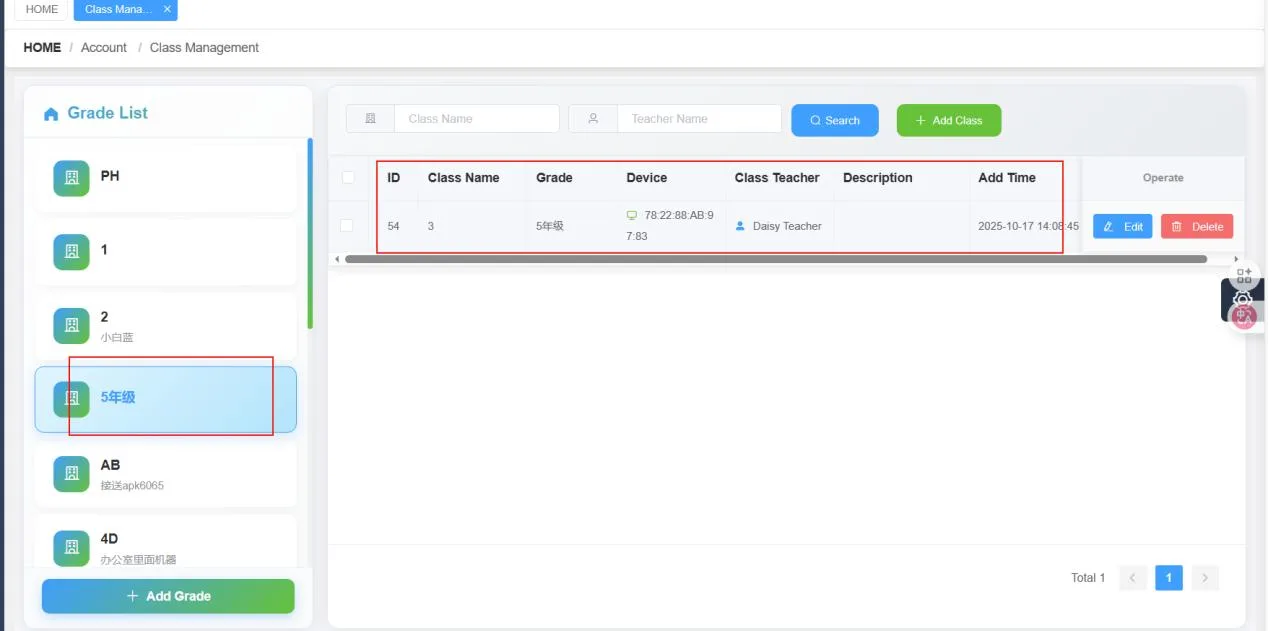
Log into the authorized school management account, go to Account > Class Management. Select the target grade and class, bind the local Riotouch interactive device and assign the responsible teacher to complete the whole configuration process.
3. Operation Guide for Riotouch VisionRoll Main Interface
After finishing backend setup, teachers can launch VisionRoll directly on Riotouch interactive flat panels:
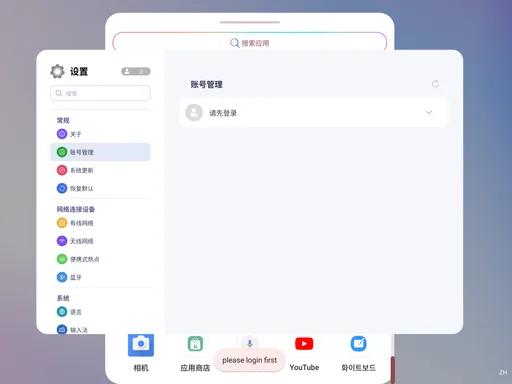
- Software Launch: Click the VisionRoll desktop icon. If the teacher account is logged in already, you will enter the main interface directly. If not, the system will jump to account management for login; restart the app afterward to use all functions normally. Devices without cameras will only display the software title page.
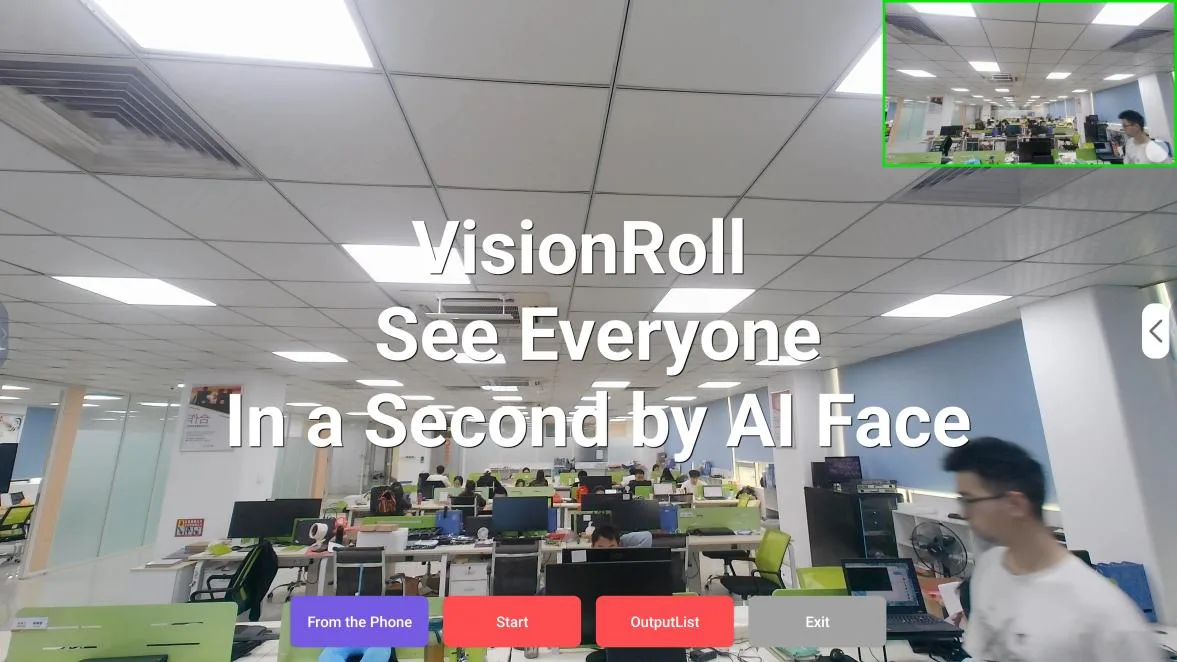
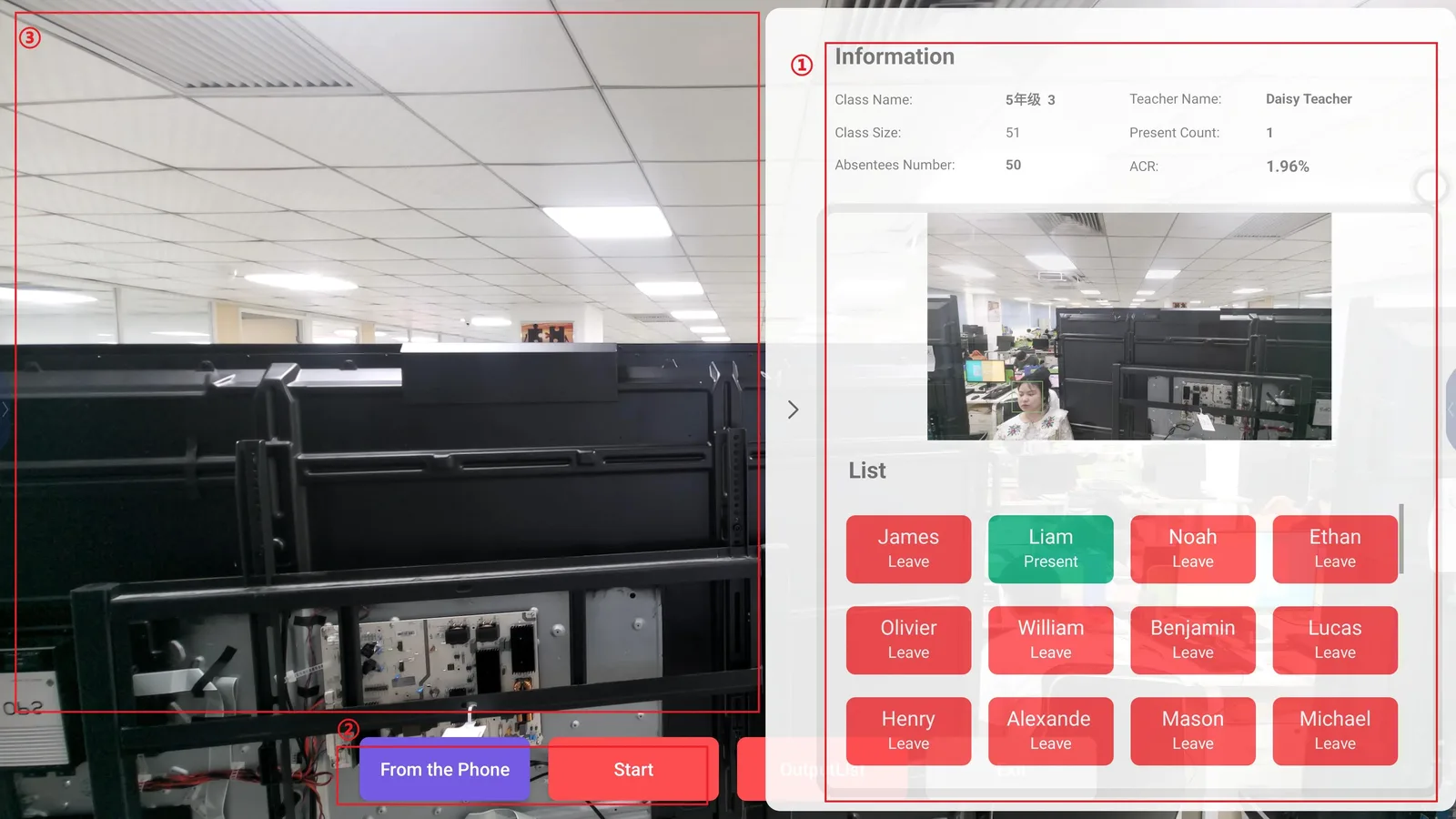
3 Core Zones of Main Interface
- Live Camera Zone: The main screen displays real-time classroom footage captured by the panel’s built-in camera.
- Bottom Function Buttons: From the Phone, Start, OutputList, Exit.
- Right-Side Information Panel: Collapsible panel showing class name, teacher name, total class size, present count, absentees number and attendance rate. Click student name cards to edit attendance status manually.
4. 5 Core Functions Covering All Campus Attendance Scenarios
4.1 On-Site Camera Attendance
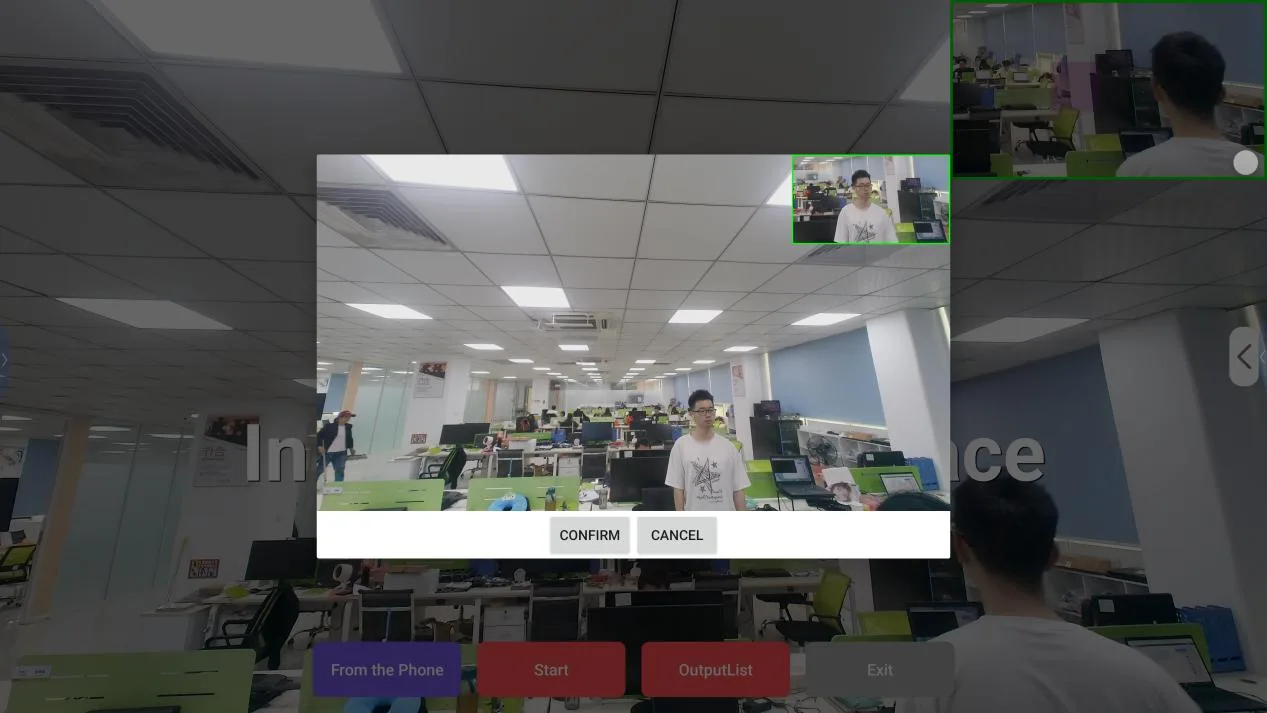
Click the Start button to activate the built-in camera of the Riotouch panel and capture the whole class. A confirmation pop-up will appear after shooting. After confirmation, AI automatically recognizes all faces: recognized students are marked green, unrecognized ones red. Teachers can adjust each student’s status based on real class situations. All captured footage is auto-saved for later administrative inspection.
4.2 Photo Attendance via Mobile QR Code
When on-site shooting is unavailable, tap From the Phone to generate a dedicated upload QR code on screen. Teachers scan the code with mobile phones to enter the image upload page. You can take new photos directly or upload local pictures. Supported formats: JPG & PNG, single file size ≤5MB. After successful upload and confirmation, the system refreshes all attendance statistics synchronously.
4.3 One-Click Switch of 3 Attendance Statuses
3 built-in status labels are available. Tap any student name card to switch status instantly, and data updates in real time:
- PRESENT: Present count increases, attendance rate rises accordingly
- LATE: Not counted as absence, no impact on attendance rate
- LEAVE: Counted as absence, attendance rate drops accordingly
If you mark a wrong status, simply tap another label to overwrite the record with one click.
4.4 Export Complete Attendance Reports
After finishing attendance for one class, click OutputList. The system automatically generates a standardized attendance report and saves it to local storage of the Riotouch panel. Reports can be viewed, printed and archived anytime to meet school administrative filing standards.
4.5 Exit App to Release System Resources
After attendance work, click the Exit button to close VisionRoll, free up camera and storage resources, and avoid occupying background performance of Riotouch interactive panels.
5. Why Educational Institutions Prefer Riotouch VisionRoll?
- Original Integrated Hardware & Software Matching: Deeply optimized for all Riotouch 4K interactive education panels, matched with built-in dual 20W speakers. It supports both attendance management and multimedia classroom teaching. The touch screen delivers lag-free smooth operation.
- Time-Saving AI Facial Recognition: Complete full-class face recognition within 3 seconds. Ditch time-consuming manual roll calls and reserve more class hours for teaching content.
- Dual Attendance Modes for Flexible Scenarios: Two attendance methods: on-site camera capture and mobile photo upload. Suitable for indoor lessons, outdoor activities and temporary class rescheduling.
- Auto Visualized Data Statistics: No manual calculation required. Real-time display of present, late and leave data; one-click report export greatly simplifies school administrative work.
- Multi-Level Backend Permission Control: Three-tier permission management for OEMs, schools and classes. School administrators can centrally manage all Riotouch teaching displays and attendance data, with cloud storage to prevent data loss.
Related Product

Need a Solution That
Fits Your Project?
Tell us what you're looking for and we'll tailor a quote to your requirements — with pricing, lead time, and expert advice.