How to Choose the Right OPS Module for Your Interactive Display
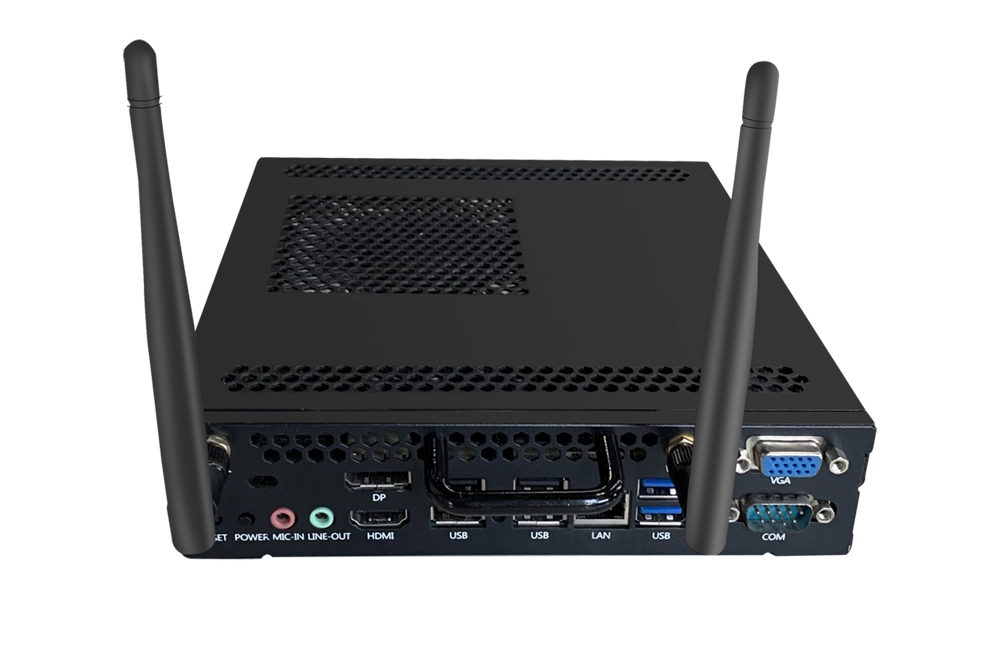
If you're new to interactive flat panels, you've probably noticed a mysterious slot on the back and wondered: what is it for? That's the home for an OPS (Open Pluggable Specification) module — the computing brain that turns your display into a standalone computer.
An OPS module eliminates the need for external laptops and messy cable connections. It slides directly into the display's slot, delivering powerful computing performance right inside the screen.
What Does an OPS Module Actually Do?
Before installation, your interactive display acts like a large monitor — it requires an external PC or laptop for any computing task. After installing an OPS module:
- All-in-one functionality — The display becomes a standalone computer. You can open files, browse the web, and launch applications directly from the panel.
- Clean, professional setup — No more tangled cables; everything is built-in.
- Enhanced performance — With powerful CPUs, generous RAM, and SSD storage, OPS modules handle multitasking effortlessly.
In short, an OPS makes your interactive display smarter, faster, and more capable.
Key Factors to Consider When Choosing an OPS Module
1. Processor (CPU) – The Brain of Your Module
The processor determines how smoothly your interactive display runs applications, from teaching software to 4K video conferencing. Riotouch offers OPS modules with Intel Core i3, i5, and i7 processors. The latest 13th and 14th generation Intel Core processors support 8K video output.
- i3 — Suitable for basic presentations, document viewing, and light browsing.
- i5 — Ideal for most classrooms and meeting rooms, handling multitasking and 4K content smoothly.
- i7 — Best for heavy-duty applications, 8K video editing, or advanced AI software.
2. Memory (RAM) and Storage (SSD)
Sufficient memory ensures smooth multitasking, while SSD storage determines how much software and files you can keep on the device. Riotouch OPS modules are available with 4GB, 8GB, or 16GB RAM and 128GB to 512GB SSD storage.
- 4GB RAM / 128GB SSD — Basic document viewing and simple apps.
- 8GB RAM / 256GB SSD — Standard for most education and business use.
- 16GB RAM / 512GB SSD — Heavy multitasking, large files, and intensive software.
3. Operating System Compatibility
Different organizations prefer different operating systems. Schools often rely on Windows for teaching software, while some enterprises or developers prefer Linux. Riotouch offers dual-system OPS modules that support both Windows 10/11 and Linux — allowing teachers to run Windows-based lesson software and developers to use Linux environments on the same device.
4. Connectivity and Ports
A well-equipped OPS module makes connecting external devices effortless. Look for:
- HDMI 2.1 — For ultra-high-definition output.
- USB 3.0 — For fast data transfer with external drives or cameras.
- Wired Ethernet & Integrated WiFi — For stable network connectivity.
- JAE 80-pin connector — The standard interface that slots directly into the display's OPS port.
5. Durability and Reliability
Classrooms, meeting rooms, and public spaces demand equipment that withstands frequent use, high temperatures, and vibration. Every Riotouch OPS module undergoes rigorous testing — including over 5,000 plug-unplug cycles and 72 hours of continuous high-temperature operation — ensuring reliable performance year after year.
6. Form Factor: OPS vs. OPS-C
When choosing an OPS module, you may encounter two form factors: OPS and OPS-C. Both use the same 80-pin connector, but OPS-C offers enhanced functionality and more connection options due to its larger size.
| Feature | OPS | OPS-C |
|---|---|---|
| Size | 180 × 30 × 119 mm (compact) | 204 × 42 × 195 mm (larger) |
| Introduced | 2010 (Intel standard) | 2015 (extended standard) |
| Connector | 80-pin | 80-pin (compatible) |
| Best for | Smaller interactive flat panels | Larger displays needing extra ports |
Quick Selection Guide
| Your Use Case | Recommended OPS Configuration |
|---|---|
| Basic presentations, web browsing | Intel i3, 4GB RAM, 128GB SSD |
| Classroom teaching, standard apps | Intel i5, 8GB RAM, 256GB SSD |
| 4K/8K content, heavy multitasking | Intel i7, 16GB RAM, 512GB SSD |
| Flexible school (Windows + Linux) | Dual-system module (Win/Linux) |
Why Choose Riotouch OPS Modules?
Riotouch has over 16 years of expertise in interactive display solutions, trusted by partners in more than 80 countries. Their OPS modules feature:
- Intel 13th & 14th Gen processors for cutting-edge performance.
- 8K video output capability for ultra-high-definition displays.
- Comprehensive connectivity — HDMI, USB 3.0, Ethernet, and WiFi.
- Industrial-grade durability with rigorous testing.
- Dual-system support for Windows and Linux flexibility.
- TPM2.0 security module for enhanced data protection.
Conclusion
Choosing the right OPS module is essential to unlocking the full potential of your interactive display. By considering your performance needs, operating system preferences, and connectivity requirements, you can find the perfect match. Whether you're upgrading a classroom, a corporate meeting room, or a government facility, the right OPS module turns a simple screen into a powerful interactive hub.
Need a Solution That
Fits Your Project?
Tell us what you're looking for and we'll tailor a quote to your requirements — with pricing, lead time, and expert advice.