Old Interactive Flat Panel Running Slow? Upgrade It With an Android OPS Module — Don't Replace the Whole Screen
Quick Summary
If your interactive flat panel is 3+ years old and lagging, you do NOT need to replace the entire screen.
An Android OPS module slides into the standard 80-pin slot on the back of almost any brand panel — no rewiring, no technician.
It brings the system up to Android 13/14, supports dual-system switching with Windows, and costs only 15-20% of a new panel.
Install takes under 2 minutes. Future upgrades? Just swap the module — never buy a whole screen again.
I get this message on WhatsApp almost every week:
"Emily, our classroom panels are 4 years old and they're so slow the teachers have stopped using them. The school budget won't cover 30 new screens. What can we do?"
If your school or company interactive flat panel is 3 to 5 years old, you already know the symptoms. The screen takes forever to wake up. Apps crash in the middle of a lesson. The latest AI teaching tools flat-out refuse to install. The Android version is so old that app stores show "not compatible with your device" more often than not.
Most buyers instinctively throw the whole screen away and buy new. But before you spend thousands of dollars per unit, let me show you a smarter, far cheaper way to bring that aging panel back to life — one that takes 2 minutes and costs a fifth of the price. It is called an Android OPS module, and it might be the best-kept secret in the AV upgrade world.
Replace vs. Upgrade: The Real Cost Difference
| Cost item | Replace with new panels | Upgrade with Android OPS |
|---|---|---|
| Hardware (per unit) | $1,200 - $2,500 | $180 - $400 |
| 50 units total | $60,000 - $125,000 | $9,000 - $20,000 |
| Installation labor | Mounting + rewiring (2 days) | Slide-in, 2 min/unit |
| Downtime | 1-2 days per classroom | Under 5 min per panel |
| Shipping (international) | Wooden crates, high freight | Small boxes, low freight |
| Old screens | Landfill or recycle cost | Kept in use, zero waste |
| Resulting system | Android 13/14, brand-new glass | Android 13/14, same glass |
| Total savings | $50,000 - $107,500 on 50 screens | |
Before we get into how it works, here is the bottom line for a fleet of 50 interactive flat panels. This is the math I walk every customer through before they decide anything:
The screen glass, the touch frame, the speakers, the LED backlight — all of those are usually still in perfect shape. You are only throwing them away because the little computer inside got old. That is the expensive mistake an Android OPS module fixes.
1. Why Your Old Panel Is Slowing Down (It's Not the Screen)
Interactive flat panels rarely die. The computing brain inside them does. After a few years of daily use, the onboard Android system hits three walls:
Outdated Android version. Older panels are often stuck on Android 8 or 9. Many education and meeting apps now require Android 11 or higher, so they simply refuse to install.
Weak CPU and not enough RAM. Legacy chips cannot handle modern multitasking, 4K video playback, or the new wave of AI-powered teaching software — AI lesson planning, real-time translation, AI question generation. The panel chokes.
No more security updates. The original motherboard no longer receives patches. The device gets slower and less safe by the month.
So the problem was never the display. It was the compute module bolted to the back of it. And that is exactly the part an Android OPS replaces.
2. The Fix: Drop In an Android OPS Module
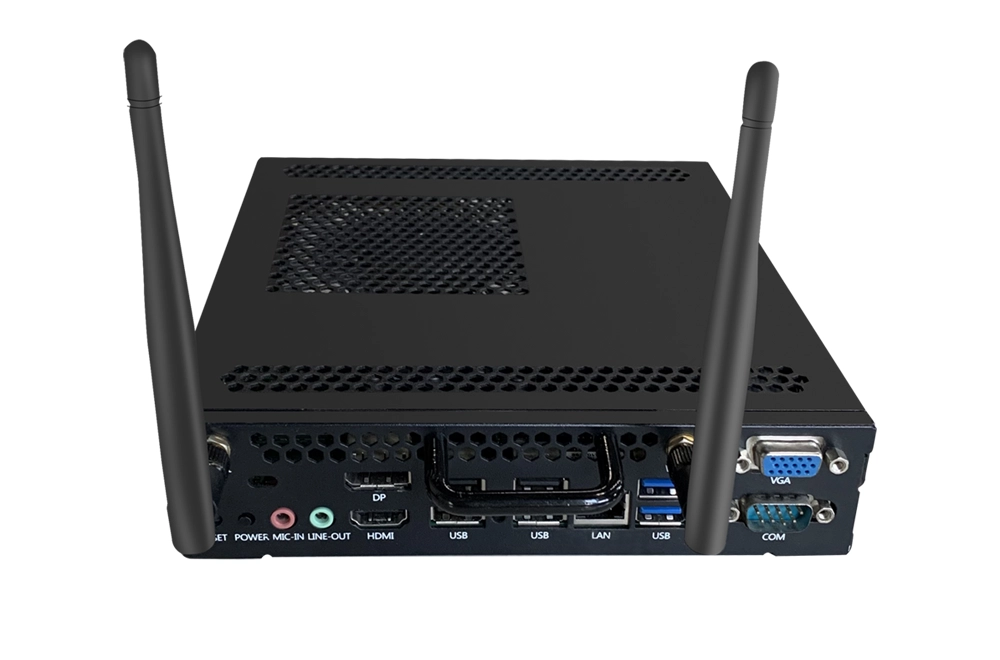
An OPS (Open Pluggable Specification) module is a standardized mini-computer that slides into a dedicated slot on the back of almost every modern interactive flat panel. Instead of replacing the whole screen, you just swap the compute module — which is effectively the same as slotting in a new motherboard, CPU, RAM, and OS in one move.
An Android OPS brings the panel straight to a modern Android 13/14 experience, powered by a current-generation chipset like the RK3576, with enough RAM and storage to run today's AI apps without a hiccup. The screen instantly feels like a brand-new machine — at a fraction of the cost.
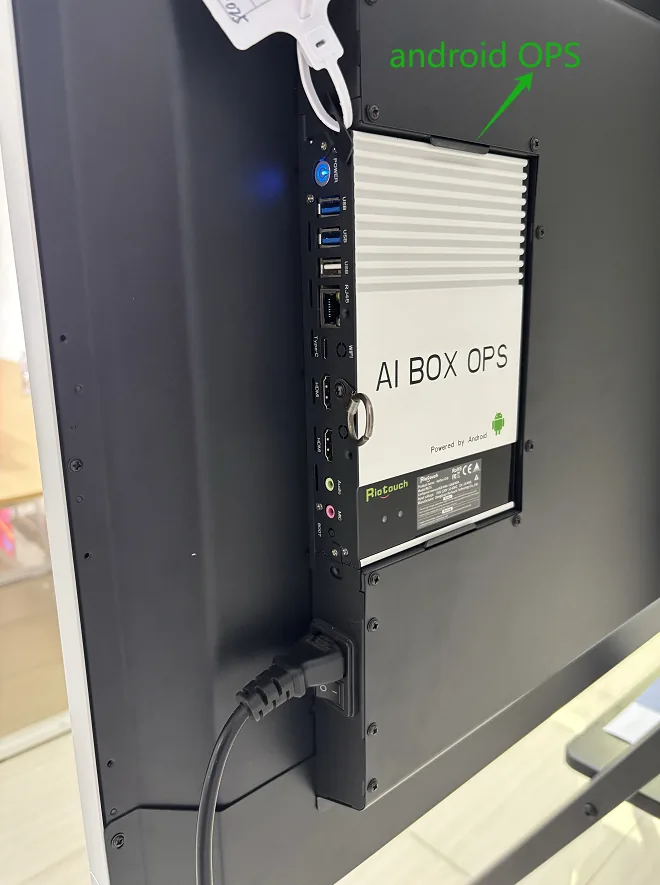
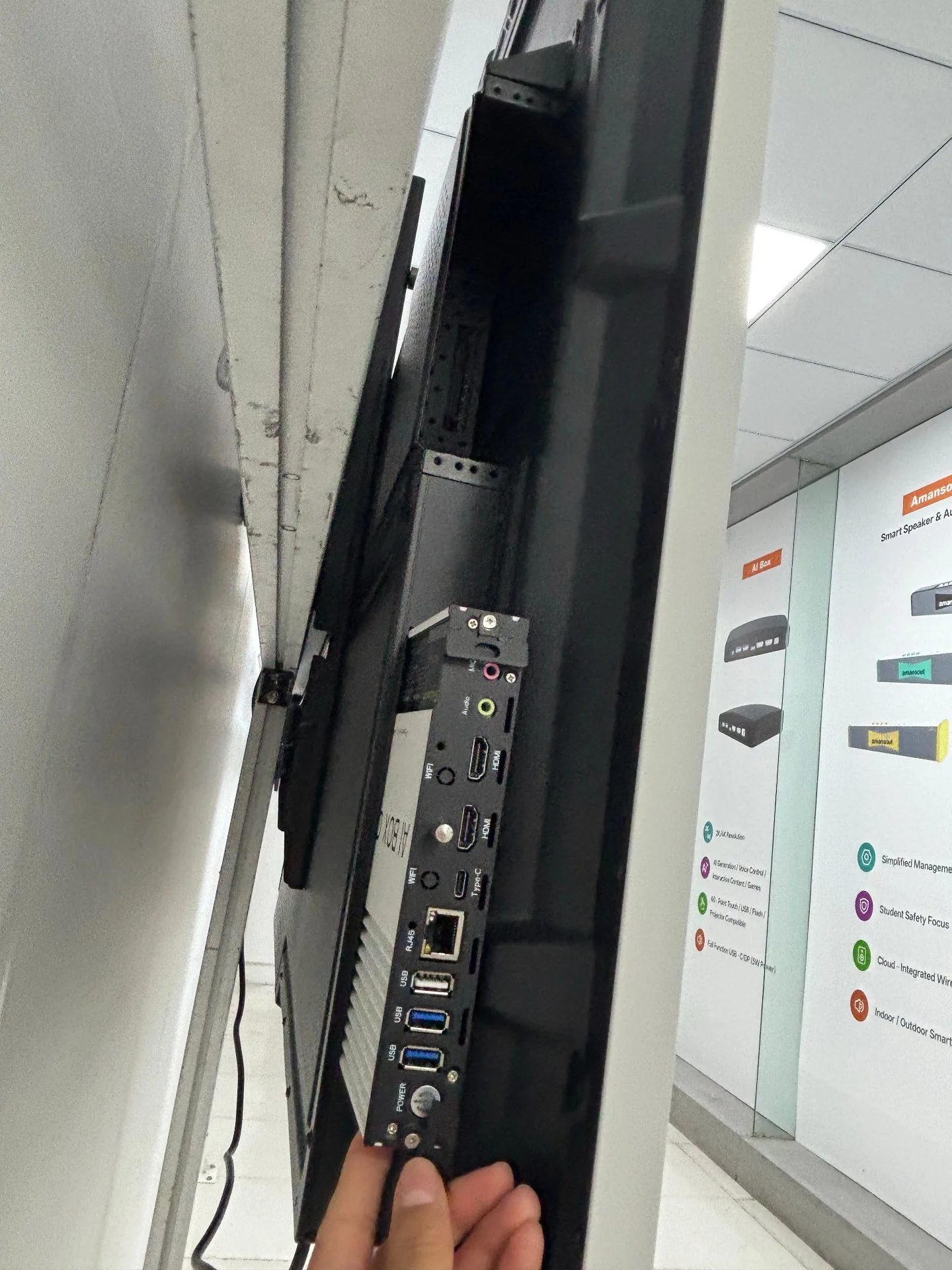
Riotouch AI BOX OPS — Android OPS module installed in the 80-pin slot on the back of an interactive flat panel
3. The Size Advantage: The Smallest OPS on the Market
This is the part I want every buyer to pay attention to, because it is the detail that makes or breaks an upgrade project with mixed-brand fleets.
Not all OPS slots are built the same way. Some are open-backed (the module just slides in from the side). Others are enclosed — a closed housing where the module has to fit flush, with no room to spare. If your OPS module is even a few millimeters too thick or too tall, it simply will not go in, and you are stuck either modifying the housing or abandoning the upgrade.
We designed the Riotouch Android OPS to solve this once and for all:
Smallest footprint in the market — matches the tightest standard OPS slot specs across all major brands.
Thinnest profile for enclosed slots — slides cleanly into closed OPS bays where thicker modules fail.
Brand-agnostic by design — dimensions decided after measuring real OPS slots from 12+ brands. Built to the smallest common denominator, not the average.
In plain terms: if your panel has a standard 80-pin OPS bay, this module goes in. Full stop. I have personally tested it on panels from 5 different brands in our Dongguan showroom, and it has not failed once.
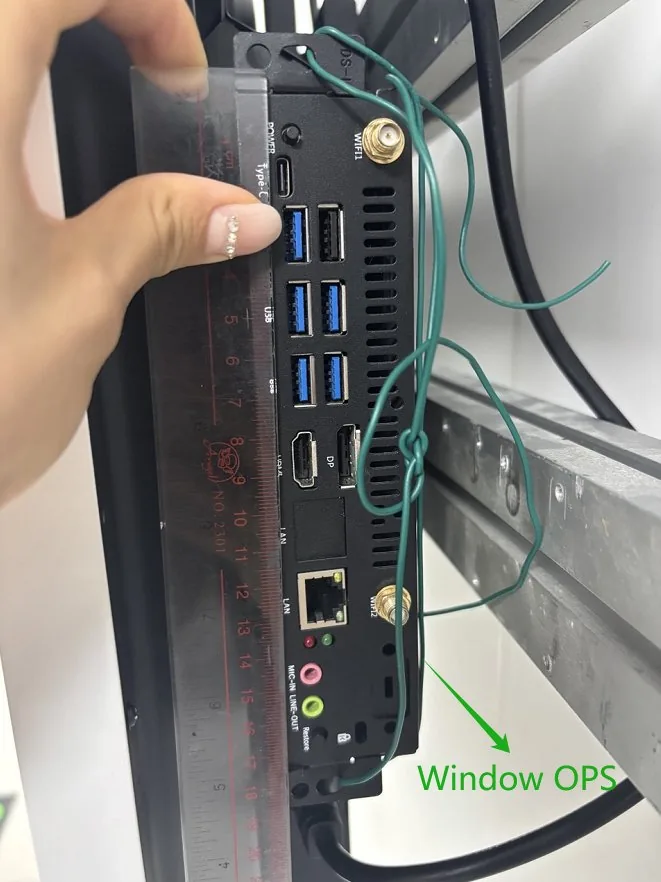
Typical Windows OPS module — thicker profile, harder to fit enclosed slots
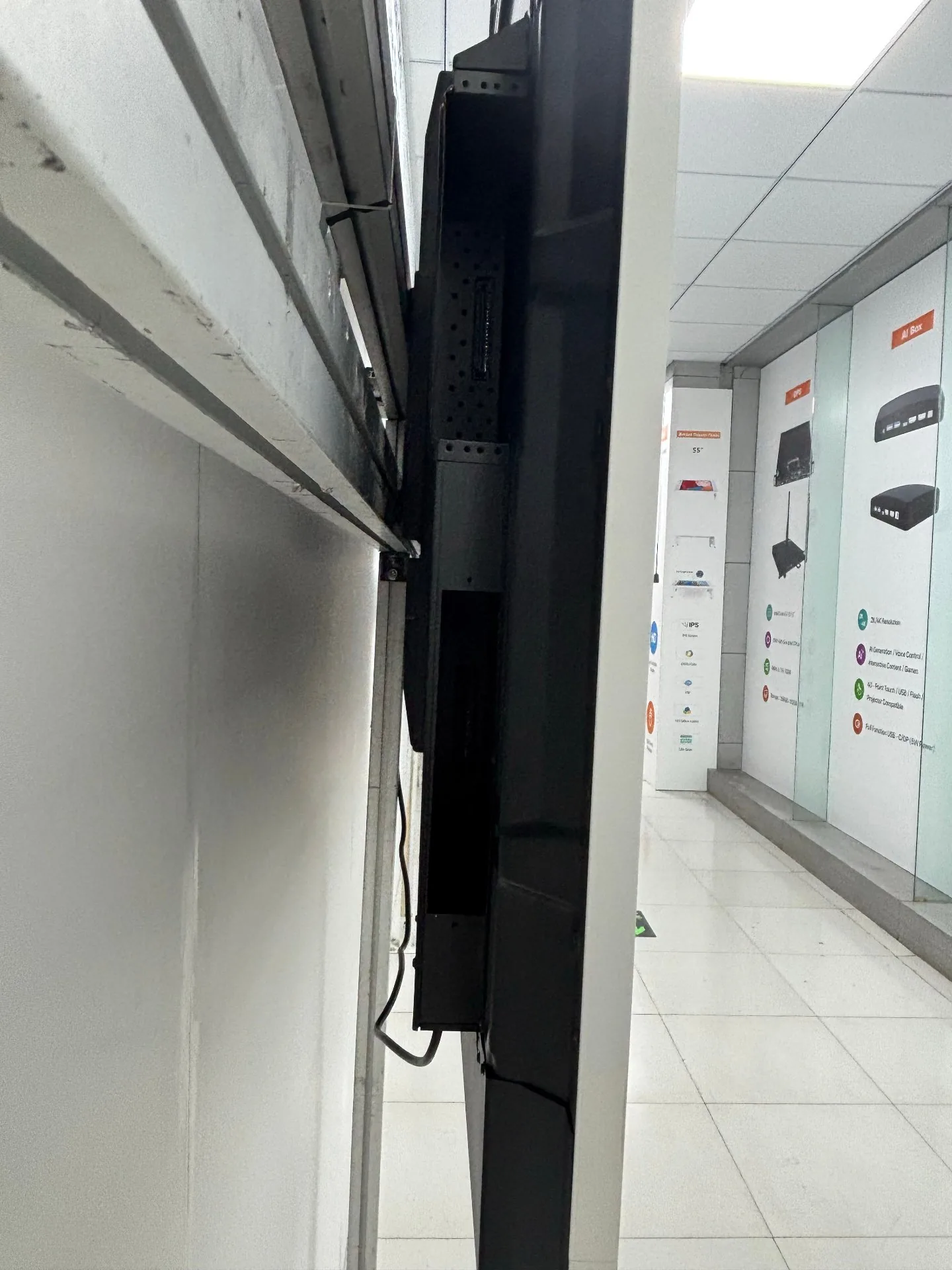
Side view — standard OPS slot on a panel back, ready for any brand's module
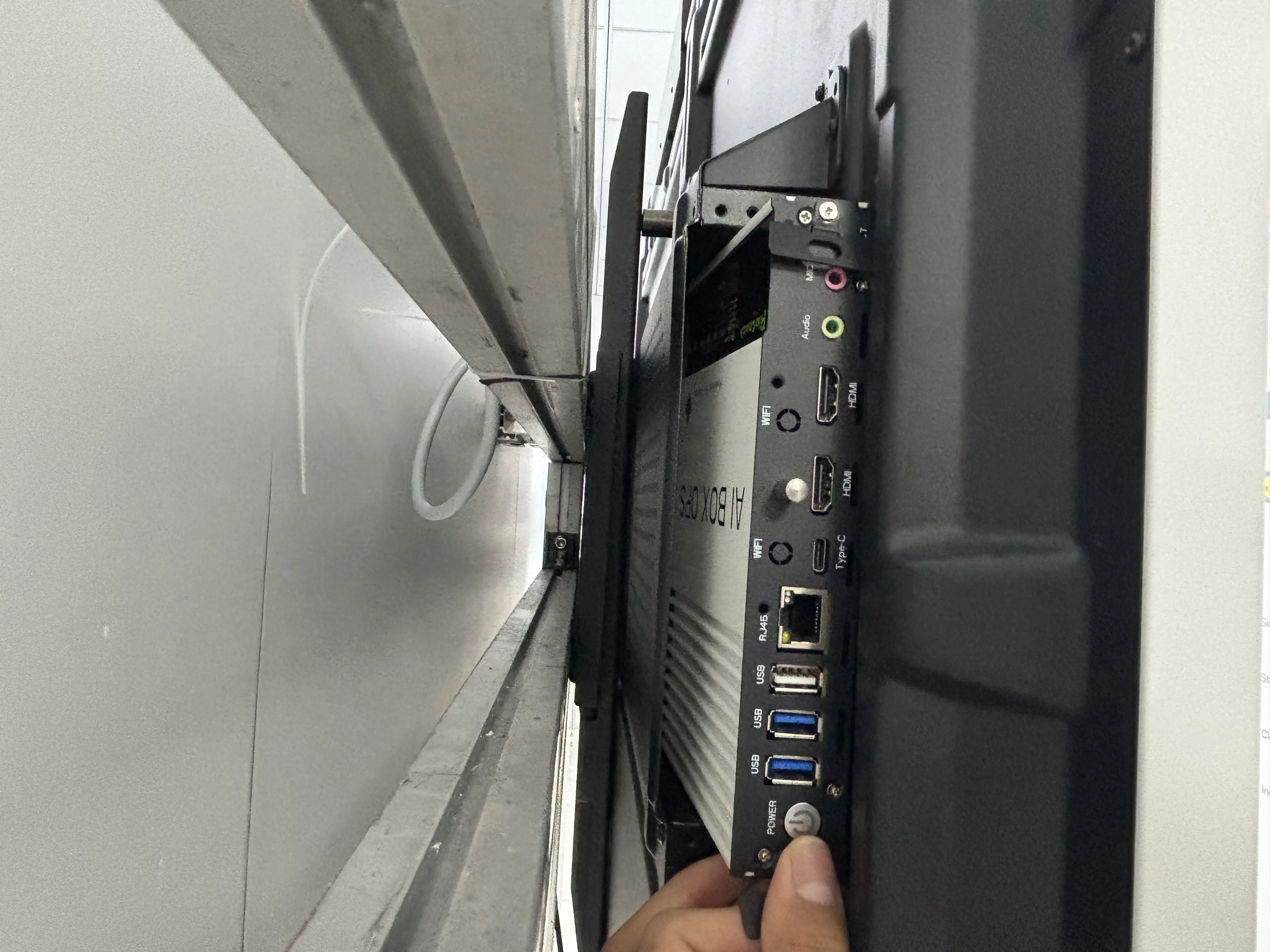
Bottom view — Riotouch Android OPS fitting flush into an enclosed slot where thicker modules would fail
4. Dual-System Support: Keep Windows, Add Android
Here is the part that surprises most buyers. An Android OPS uses the exact same 80-pin OPS interface as a Windows OPS. That is an international standard (Intel Open Pluggable Specification), not a Riotouch trick.
If your panel already has a Windows OPS inside, you can add an Android OPS alongside it, or swap between them in seconds.
Most interactive flat panels built in the last 5-7 years already support dual-system switching — you just press the source button to jump between Windows and Android on the same screen.
After the upgrade, teachers can run Windows-only exam software in the morning and Android AI teaching apps in the afternoon, on the same panel.
You are not choosing one system over the other. You get both, and you switch anytime.
5. Works With Almost Any Brand — Yes, Really
The biggest concern I hear from buyers is: "Our classrooms have panels from 3 different brands. Will your OPS work on all of them?"
Yes. Because the 80-pin OPS interface is an industry-wide standard, an Android OPS module is not locked to any single brand. As long as the panel has a standard OPS slot — and almost every IFPD made since 2018 does — the module fits and runs.
This solves a headache that has stalled school upgrades for years: mixed-brand fleets. Instead of sourcing different upgrade parts for each brand, you standardize on one Android OPS across the whole fleet. Procurement, training, and IT support all get dramatically simpler.
6. Plug-and-Play: Install in Under 2 Minutes
You do not need an engineer on site. The install is genuinely this simple:
Power off the panel.
Unscrew the old OPS module — one screw, usually thumb-turnable.
Slide in the new Android OPS until it clicks.
Power on, select the OPS source, and you are running fresh Android.
No cable rewiring, no software flashing, no technician dispatch. A school IT admin can upgrade an entire classroom of panels in a single afternoon.
Plug-and-play installation — slide the Android OPS module into the 80-pin slot, no cables, no technician needed
7. Lower cost — on the screen, in the warehouse, in the shipping container
The savings go well beyond the unit price:
Unit cost: An Android OPS module costs only 15-20% of a brand-new interactive flat panel. For 50 screens, that is the difference between a $75,000 budget and a $15,000 budget.
Demo cost: Because the module is small and cheap, you can carry a couple units to a customer site and install them straight into the customer's old panels for a live demo. No need to ship a heavy demo screen. Deals close faster.
Import and logistics: An OPS ships in a small box, not a wooden crate. Freight, customs duty, and last-mile delivery drop by 80-90% compared to importing full-size panels. For distributors in India, the Middle East, Africa, and Latin America, this alone often justifies the switch.
Inventory risk: A distributor can stock 50 OPS modules on one shelf instead of a warehouse full of screens. Cash flow improves dramatically.
8. Future Upgrades Are Now Just a Swap
Here is the long-term win most buyers miss. Once you standardize on the OPS architecture, every future upgrade becomes trivial.
Android version outdated again in 3 years? Swap the module — do not touch the screen.
A module fails? Replace only the module, not the whole $2,000 panel.
Want to switch a room from Android to Windows? Swap the module.
This drops the technical barrier hard. Your IT team does not need to be display experts — they just need to know how to slide a module in and out. Maintenance cost over a 10-year lifecycle falls to a fraction of what non-modular panels cost.
Why Choose Riotouch as Your Android OPS Supplier
I am not going to pretend every OPS module on the market is the same. It is not. Here is what makes the one we build in Dongguan different:
Smallest OPS body on the market — engineered to fit the tightest enclosed slots across all major brands, not just our own panels.
Universal 80-pin compatibility — works with your existing panels regardless of brand. Send us your model list and we confirm fit within 24 hours.
RK3576 chipset, Android 13/14 — current-generation performance, with optional Google EDLA certification for full Play Store access and enterprise security.
Full OEM/ODM — custom logo, boot screen, packaging, firmware localization. It becomes your product.
Dual-system ready — pairs with our Windows OPS line for true Windows + Android flexibility on one panel.
10+ years, 80+ countries — we have been manufacturing interactive flat panels and OPS modules for over a decade, exported to 80+ countries. This is not a side product for us.
Real talk from Emily: I personally reply to every inquiry that comes in. If you send me your panel brands and model numbers, I will have our engineers confirm compatibility and send you a wholesale price + sample quote within 24 hours — no auto-responders, no "please hold" music.
Frequently Asked Questions
Q: Will the Android OPS module work with my existing interactive flat panel?
A: Most likely yes. As long as your panel has a standard 80-pin OPS slot — and almost every interactive flat panel manufactured since 2018 does — the Android OPS will fit and run, regardless of brand. The Riotouch module is engineered to the smallest standard slot dimensions, so it fits even the tightest enclosed bays. Send us your panel's brand and model, and our engineers confirm compatibility within 24 hours.
Q: My panel's OPS slot is enclosed/closed. Will the module fit?
A: Yes — this is exactly the case we designed for. The Riotouch Android OPS has the thinnest body profile on the market, built to slide cleanly into enclosed OPS bays where other, thicker modules simply will not go. No forcing, no shaving the housing, no custom brackets.
Q: Can I keep Windows and add Android at the same time?
A: Yes. The 80-pin OPS interface is the same standard used by both Windows and Android OPS modules. Most panels built in the last 5-7 years support dual-system switching, so you press the source button to jump between Windows and Android on the same screen.
Q: How long does installation take?
A: Under 2 minutes per panel. Power off, unscrew the old module (one screw), slide in the new Android OPS, power on. No cable rewiring, no software flashing, no technician required. A school IT admin can upgrade an entire classroom in one afternoon.
Q: How much does an Android OPS cost compared to a new panel?
A: An Android OPS module typically costs 15-20% of a brand-new interactive flat panel. For a 50-screen fleet, that is the difference between a $75,000 budget and a $15,000 budget — saving up to 80% while delivering the same fresh-Android experience.
Q: What Android version does the Riotouch OPS run?
A: Our Android OPS modules run Android 13 or 14, powered by the RK3576 chipset, with optional Google EDLA certification for full Google Play access and enterprise-grade security updates.
Want to test an Android OPS module on your old panels?
Tell me the brand and model of your existing interactive flat panels. I will have our engineers confirm compatibility and send you a wholesale price + sample quote within 24 hours.
Email Emily: emily@riotouch.com
WhatsApp / WeChat: (+86) 15581287281 | Skype: 3374334881@qq.com
I reply to every inquiry personally. — Emily
Have a question about upgrading your interactive panels? I reply to every inquiry personally.
Related Product
Need a Solution That
Fits Your Project?
Tell us what you're looking for and we'll tailor a quote to your requirements — with pricing, lead time, and expert advice.