Riotouch DMS: How Cloud Device Management Makes Smart Classrooms Easier to Manage
Managing dozens or hundreds of interactive displays across multiple classrooms can quickly become a challenge. IT teams need to monitor devices, update applications, push teaching resources, and troubleshoot equipment—all without having to visit every classroom.
This is where Riotouch DMS (Device Management System) makes a difference.
Riotouch DMS is a cloud-based management platform designed to help schools, education groups, and organizations centrally manage users, interactive displays, audio equipment, digital resources, firmware, applications, and classroom content from one platform.
What Is Riotouch DMS?
Riotouch DMS is a cloud platform developed to simplify the management of interactive displays and related classroom equipment:
- Account Management
- Device Management
- Group Management
- Firmware Management
- Application Management
- Resource Management
- AI-Generated Teaching Content
- Pick-up and Drop-off Management
The platform also provides a dashboard where administrators can view user activity, device status, usage trends, application usage, online device rankings, and equipment growth.
Why Do Schools Need Cloud-Based Device Management?
As schools adopt more interactive displays, the number of devices that need to be maintained increases rapidly. Imagine a school with 30 classrooms and 30 interactive displays. For a school group with multiple campuses, the number can easily grow into hundreds of devices.
- Visit classrooms individually
- Check device status manually
- Install applications one by one
- Update firmware separately
- Transfer teaching materials manually
- Troubleshoot devices on-site
- Configure settings repeatedly
Riotouch DMS is designed to reduce this workload by bringing these operations into a centralized cloud platform.
1. Centralized Device Management
One of the key functions of Riotouch DMS is centralized equipment management. OEM accounts can manage interactive all-in-one devices and audio equipment, including adding devices, assigning permissions, controlling devices, and viewing device information. Devices can be searched by device MAC address or device model. When a device is added, information such as its MAC address, OEM, model, region, and device type can be registered in the system.
2. Remote Control from the Cloud
One of the biggest advantages of DMS is that administrators do not always need to be physically present in the classroom. Once the device is connected to DMS and the appropriate permissions are assigned, administrators can remotely control devices through the cloud platform.
3. Remote Testing and Troubleshooting
Riotouch DMS also provides several device testing functions, including Touch Test, Camera Test, and Microphone Test. These functions can help administrators evaluate device operation remotely and support maintenance and troubleshooting.
4. Push Files and Applications Remotely
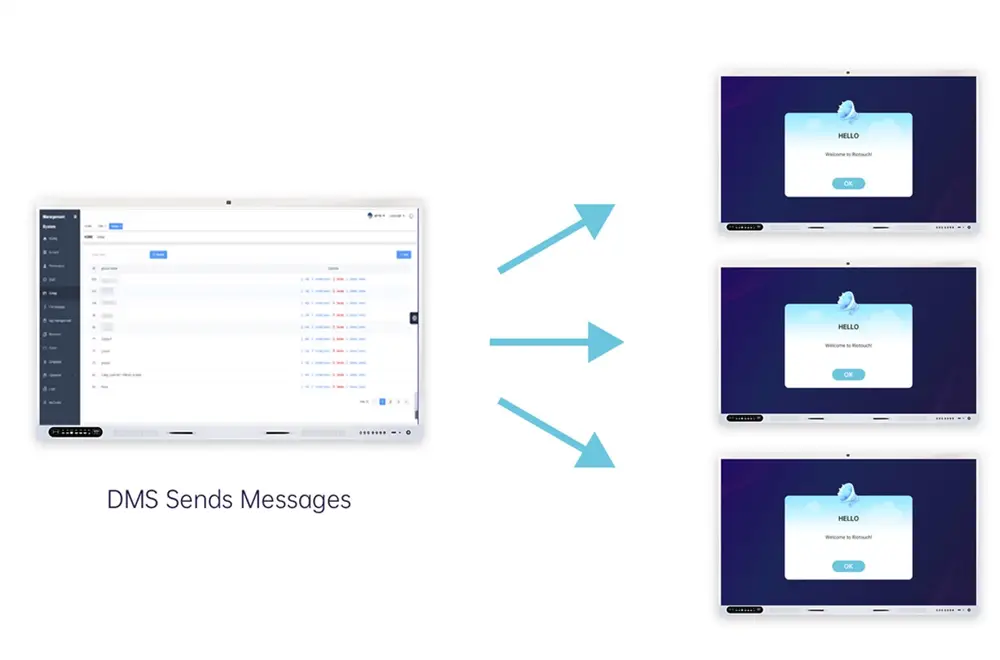
With Riotouch DMS, administrators can transfer files to designated devices from the backend. Supported content includes videos, audio, images, and installation packages. Installation packages can also be transferred and installed as APK applications on supported devices.
5. Create Workflows for Repeated Operations
Riotouch DMS provides a Workflow function that allows administrators to organize multiple commands and execute them sequentially. Available instructions include shutdown, restart, send alarm, message notification, lock/unlock, backlight adjustment, volume adjustment, and signal source switching.
6. Manage Devices by Groups
Riotouch DMS allows administrators to create device groups and assign multiple devices to each group. For example, devices can be organized by Campus → Building → Grade → Classroom, or by School A → School B → School C. This makes DMS especially suitable for schools, education groups, training centers, and multi-campus deployments.
7. AI-Generated Teaching Content
Riotouch DMS is not limited to device management. The platform also integrates AI Gen, allowing users to generate educational content directly from the platform:
- AI Course Generation — configure subject, grade, teaching standards, learning outcomes, course structure, language, page count, and teaching time.
- AI Quiz Generation — create questions based on subject, grade, language, and quantity.
- AI Flashcards — generated based on a selected topic, language, and quantity.
8. Manage Teaching Resources in the Cloud
Riotouch DMS provides resource management functions for organizing subjects, grades, courseware, 3D resources, and other educational materials. Teachers can upload courseware and configure its visibility as public or private. The courseware design environment allows teachers to add interactive hotspots containing images, videos, links, audio, and questions.
9. Support 3D and Interactive Learning Resources
Riotouch DMS supports custom uploading of 3D courseware for display through the Umind environment. Users can upload supported 3D resources or supported formats such as OBJ files and organize them according to subjects and grades. The platform also includes access to resources such as PhET simulations and a periodic table.
10. Smart Pick-up and Drop-off Management
Riotouch DMS includes a Pick-up and Drop-off System designed to support school dismissal management. The system allows schools to manage grades, classes, students, locations, and audio settings. When a location is added, the system can automatically generate a QR code. Parents can scan the location code and enter their fixed pick-up and drop-off code, after which the configured speaker can play the corresponding broadcast content.
11. Firmware and Application Management
Riotouch DMS provides OTA Management, where users can view information such as device model, OTA package name, version number, update type, upgrade type, and addition time. Application management can also provide information including application names, package names, versions, APK download addresses, and other application details.
12. Designed for Schools, Education Groups and System Integrators
For Schools
- Monitor classroom devices
- Manage teachers and students
- Push digital resources
- Perform remote troubleshooting
- Organize classroom equipment
- Generate AI teaching content
For Education Groups
For organizations managing multiple campuses, centralized device and group management can simplify large-scale deployments.
For System Integrators
DMS provides an additional layer of value beyond hardware. Instead of offering only an interactive display, integrators can build a more complete solution around: Interactive Display + Cloud DMS + Digital Resources + AI Teaching Tools. This can help transform a hardware project into a more complete smart education solution.
From Interactive Displays to a Complete Smart Classroom Ecosystem
The evolution of interactive displays is no longer only about screen size, resolution, touch points, or processor performance. As schools deploy more smart devices, the ability to manage those devices efficiently becomes equally important.
Riotouch DMS connects several key elements of a modern digital classroom: Devices → Cloud Management → Remote Control & Maintenance → Teaching Resources → AI Content Generation → Smart Classroom Applications.
Why Choose Riotouch DMS?
Riotouch DMS combines device management, cloud control, educational resources, AI content generation, and classroom management within one platform. Instead of treating every interactive display as an isolated device, DMS provides a way to manage the broader ecosystem around it. For schools and organizations planning a large-scale interactive display deployment, this means the solution can extend beyond the initial hardware installation and support long-term operation and management.
Related Product
Related Articles
WhatsApp: +86 138 2910 5761
Sales Team · Riotouch Technology